


Latest Comments

Guest - Aislinn Dyestuff Citizen Science.
09. Oktober 2026
This is a great project. I look forward to the results. Thanks for letting us know.
Guest - Aislinn Time for...
09. Oktober 2026
Looks delicious!
Guest - Katrin Sprang Discussion
18. September 2026
Hi Rachel, I have looked for more photos of you, but that was not very successful. I found a link on...
Guest - Beatrix Sprang Discussion
15. September 2026
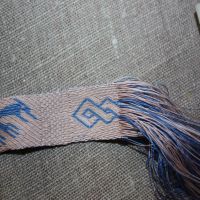
That lozenge pattern element is not a photograph, but a scan. So it should be to scale. But I pinned...
Guest - Katrin Sprang Discussion
15. September 2026
I was not referring to Rachel's reconstruction (is the reconstruction you refer to the one photograp...
APR.
09
0

Here's Your Digital Security Stuff Reminder.


Here's your gratuitous service announcement, since it is spring - no, really, for no other reason than that I've recently stumbled across these issues again, and found it smart to check - and change - some of my passwords… which, admittedly, I am doing way too rarely.


So… amidst all the spring cleaning, and the gardening, and spending time outside where it's finally nice and sunny again, maybe you can make time for some spring security stuff regarding your computer?


Thing One: Make a backup. I've written about that before, but it never hurts to repeat this from time to time. Hard disk drives are, yes, prone to die at some point, and preferrably at the worst possible point for you. So get yourself an external disk, or - if you are data paranoid - a simple RAID 1, and backup your data. There is plenty of free software around; I use SyncBack (not because it's the best ever, but because I got it at some point, it's all set up, and I have not seen a need to change it yet).
While you're at it, make sure that you will be reminded to actually use your backup software and equipment. Put a reminder into your calendar, set a recurring to-do on your to-do-list, or do whatever else works for you to do periodical backups of your important data.


Thing Two: Make sure your software is up to date. (Most software updates itself readily on its own if you allow it to do so; there's usually a "check for updates" menu item somewhere in the Help or Options menu.) Outdated software can pose a security issue - and sometimes the new version comes with nifty new features that make life a lot easier. (Sometimes they come with annoying new features, admittedly... but well. Life.)


Thing Three: Change some passwords. There is a rather good chance that at some point in time, you too were affected by a data security breach - that is someone stealing personal information from some portal or website that you have an account at. These stolen data then turn up in form of lists somewhere on the Internet, for other shady individuals to use for dark deeds. Such as sending you spam emails, or using your address to send spam from.


Fortunately there are sites that let you check if your email was leaked, and if other personal data got out as well. The Hasso-Plattner-Institute offers a free Identity Leak Checker, where you can check if your personal data was leaked.


A second site worth checking out is "have i been pwned". This not only lets you check for your email address - it also has a search function where you can input a password and see if that has been leaked and is on a list available in the Internet.
If you get hits, you should change the password on the sites that you use that specific email address for. Which is annoying and might be a lot of work, but might save you a good amount of heartache and hassle in the long run. And spam. It might save you from getting as much (or, worse, having it posted from your account).


If you set any new passwords, there's a few good guideline things to remember. Most important of them all: Don't use the same password for several sites, especially not important ones with sensitive data, such as your bank data. Managing that ever-increasing number of passwords is a hassle, which is why password managers such as KeePass are a very good thing - you only need to remember one master password to access the database, where you store all your other passwords. These managers can also remind you to change your passwords regularly, which is a feature that I have now (finally) enabled... because I'm just as lazy, or as prone to forget about the age of a password, as the next person is.


For the master password, or any other important password that you need to type in on your own, you should choose a strong one that you can remember easily. There's a brilliant XKCD comic about strong passwords that fit the bill - which is the type of password I use for the ones that I actually want to remember. For those used only rarely, and only from my home machine, I tend to let the password generator in my manager do the work; it spits out a long random string of numbers and characters which is pretty secure.


So. Ready for some cyber housekeeping?
0
NOV.
01
0

Technics Woes.

My trusty little computer and my little phone have conspired to make my life a little more interesting, resulting in about one and a half days lost with trying to get Windows running again and transferring data from the old phone to the new one.

Just in case you are running Windows on your machine, and just in case you have not done so - go and make yourself a system recovery CD or USB-stick or whatever works for your machine. It can make things much, much easier (since the stuff the companies give out as "recovery CD" only give you the option to wipe drive C: completely or to wipe everything completely, no repair options given). I thoroughly recommend it. It also takes next to no time to do. As Mighty Microsoft themselves instruct us: Click the start button, open the Control Panel, click System and Maintenance, and then Backup and Restore. In the left pane, click Create a system repair disc, and then follow the steps.

I also recommend getting a bit more info on whether your system is compatible with a new-fangled spiffy drive or not... before you kill a few drivers in your running system trying to get the new drive running, and consequently have troubles getting to work again. It was sheer bad luck that this mishap killed both the touchpad and the keyboard drivers simultaneously, together with freezing the system at some point where everything looked fully loaded but obviously was not.

I could possibly have saved a bit of nerves and a bit of time, by the way, if I had thought of stealing a cable-bound USB mouse from the Most Patient Husband's desk earlier...

 
In the end, I did manage the transfer - I installed Windows7 on the empty new SHDD (to find out that it did not work really well either, by the way), made a recovery CD from there, then repaired my old installation of Windows, bringing it to a state where the cloning tool was happy with it and actually agreed on cloning the old disk to the new one. It cost me about a day and a half, a lot of nerves and a few tears, but it did get done in the end and now I'm happy to have a stable system and enough space for photos and documentation for the Forum. Whew.

Next time, I'll try to have better timing!
0
OKT.
16
0

Computer Meh, Mostly Resolved.

So... the computer is sort of back to normal, the internet issue has been resolved. There's something deep in the innards of windows called "winsock catalogue", and if that catalogue somehow becomes faulty, the connection does not work anymore. Fortunately there are search engines, and there are other machines in this household that have internet connection, so following the semi-old adage "if in doubt, google it" I found that as a possible solution, followed the instructions, and there I was, back in touch with the 'Net.

I also searched for the reason for the bluescreen (which kindly also includes a self-description number), and it looks like there is a hardware fault to blame, either the RAM or the HDD. Since a thorough test of the RAM brought no errors, it is probably that my disk is nearing the end of its lifespan. Sigh.

So I'll be buying a new drive sooner than later.

And because this is probably all really boring for you (it would be for me, if it weren't my data, and thus a good part of my livelihood, on the line), here are some links to add some proper content to this post:

If you happen to be in England or are coming to London, there's a new exhibition starting in the British Library this Friday: Anglo-Saxon Kingdoms: Art, Word, War. It will run until February 19, 2019.

There have been dye analyses made on an ancient sock held in the Smithsonian, and the result is that several different colours have been achieved using the tree usual suspects woad, weld, and madder. Here's a shorter article about the sock in the Smithsonian magazine, and here is the complete article about the analysis of the sock and three more fragments: A multispectral imaging approach integrated into the study of Late Antique textiles from Egypt (Joanne Dyer, Diego Tamburini, Elisabeth R. O’Connell, Anna Harrison).

And right around the corner from where I live, there will be some archaeology done: Three digs are scheduled to be made in the Nuremberg area, two starting next week and the third next year... (article in German).
0
OKT.
15
0

Oh Glory of Modern Technology. Or Not.

I like modern tech. I am very, very fond of my little computer, and I'm even more fond of its connection to the Internet, source of all things imaginable. Plus email, of course.

So I was a very unhappy little camper when I had a bluescreen of doom, which resulted in a surprise reboot with gratuitous checkdisk, and the latter telling me there are some inconsistencies (as in there is stuff that is supposed to be used for data, but looks empty). Not fun. Not fun at all, and it makes me a little wary about the state of my hard disk.

Just in case, I'm now making a second, separate backup (because I don't want to overwrite files on my regular backup with potentially corrupt ones) and then I'll see what things look like. Also then I'll try to find out why the thing refuses to connect to the Internet... which requires doing stuff to the innards of Windows, and rebooting, both things I'd prefer to do only after backing up my data.

If you have a computer, and are not backing up regularly yet - go get yourself an external drive or two, download SyncBack or some similar backup programme (there's plenty of free ones around), and get your data safe. You never know what will happen, or when, and having a backup is a really, really good idea. I have had three disks die on me up to this day, not counting the currently maybe-not-so-healthy-anymore-one, and two of them happened during my thesis writing. I learned the hard way about the importance of backup with the first crash, where I had no backup at all and actually went and paid for professional data restoration. I was lucky and got all my data back, though it took a while and cost what was for me, back then, a really painful shitload of money, so since then I have been a conscientious backupper.

Please go be one too. You will never regret it.

(This, by the way, was written on the most patient husband's computer... since mine still refuses to grant me access to the net. Hooray for redundancy. Oh, and the whole thing obviously happened when I was happy to again be sort of on top of things, and threw me right back into the oh-no-I-am-way-behind ditch. Sigh.)
0
JULI
18
0

Cat Shenanigans.

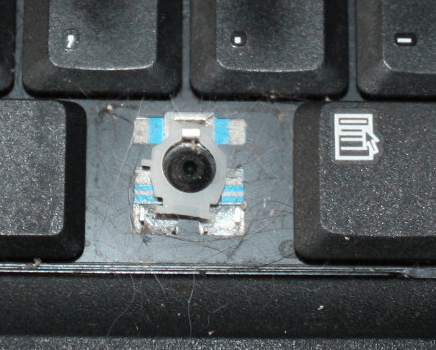
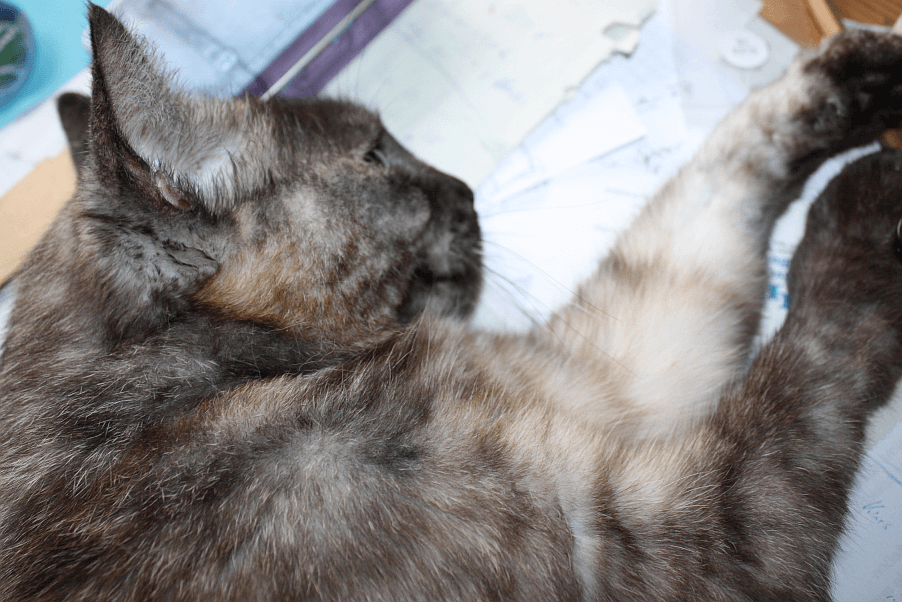
The cat, kind soul that she is, wanted to let me know she thinks my keyboard could use a bit of a cleaning. As she is perfectly and clearly understandable when she meows and purrs, but her human personnel are a bit slow on the uptake, she had to use drastic measures to demonstrate the cleaning necessity.

Which was achieved by hooking a claw underneath the Alt-Gr key and pulling. This, of course, was at first misinterpreted by her desk-sitting, cat-petting human as a mere coincidence, as she likes to knead when she's hanging out on the desk. The human was soon aware, though, that there was an astounding amount of dust and cat hair under that key... so obviously, there must have been a reason for the cat to do this. Right?

[caption id="attachment_3236" align="alignnone" width="902"]The culprit, erm, the graciously observant cat right after the deed, acting like nothing has happened. The culprit, erm, the graciously observant cat right after the deed, acting like nothing has happened.


So I did take the hint, and subsequently the small vacuum cleaner with a little brush (after Madame had left the desk, of course, as she is not fond of vacuum cleaner noises), and removed more astounding amounts of cat hair and dust from underneath the other keys.

Then came the fun task of figuring out how the three bits of plastic are supposed to fit together... and after two or so false starts, I managed to get them into correct order and position again.

[caption id="attachment_3238" align="alignnone" width="436"]One of the plastic bits. And cat hair. One of the plastic bits. And cat hair.


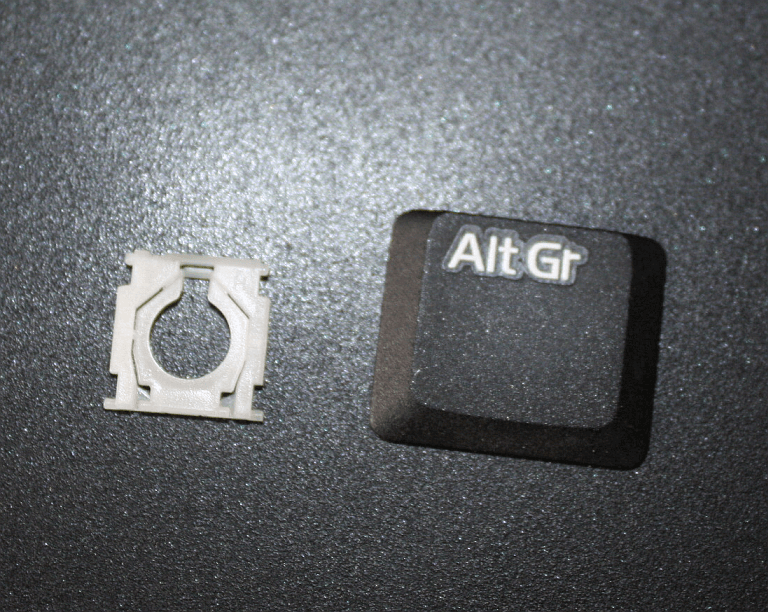
Placing the two white parts together again required bending the smaller one to get the little axles into their sockets again; for the rest, it was the combination of sliding something into one holder, then pressing the other end down until it clicked into place - once to fasten the white bits to the key plate, once to secure the whole setup to the keyboard again.

[caption id="attachment_3237" align="alignnone" width="768"]The two white bits, reunited, waiting to be set back into place underneath the key plate. The two white bits, reunited, waiting to be set back into place underneath the key plate.


Actually, that was fun, if a bit scary when doing the bending-to-set-into-place-bit (especially as I had to do it twice, not getting the stacking order correctly at the first go. Not something I'd have chosen to do this morning without the cat prompt, but I do find it interesting to see how things like that work - and putting torn-apart bits together is an excellent way to figure that out.

Now, though, I hope the cat will abstain from pulling out more keys - I do have actual work to do...
0
JULI
06
3

Oh the joys of construction work.

We're having construction work being done (the heating system in our house needs to be replaced), and I find that I'm all out of practice ignoring construction work sounds. That used to be much, much better in the days I was digging more, with all the construction site noise right beside you day in, day out, so you'd get used to tuning it out.

Though admittedly it's something else again when it is in the same building, as it's not only the noise, but also the vibrations and the workers going in and out the door. Which is visible from my workspace and adds to the distractions. Usually there's not much traffic down our garden path, or much noise here in the quarter, so it really helps me to appreciate even more the circumstances I can normally enjoy!

Speaking of enjoyable things - I finally got on top of my email pile again, and things feel more or less caught up, though the next deadlines, I'm sure, are already conspiring to creep up on me. While I have more of an opportunity to take care of long-overdue things, I'm quite happy to do so. And in the course of this I finally found a programme that will do the angle measurements I need for my spinning documentation in the way that I want them: several of them permanently shown in the picture, with a label with the angle beside it. And it's even possible to lock in the angle tool so I don't have to select it again for every single measurement, plus there's a list of measurements and the automatic calculation of the average. Yay!

The programme is called Digimizer, and like so many good and helpful research tools, it is completely free. (ImageJ will also measure angles and label them, but I haven't been able to trick it into keeping the first angle when doing the second one. Just now, while doing this post, I find that there's a new version of the programme, ImageJ2, as well as an offspin called Fiji - and I might check them out for other analysis purposes.)
0
FEB.
03
0

Internet Hiccups & Computer Shenanigans

Sorry for the blog silence - my Internet was taking a day off today and only recently reappeared.

Having this kind of trouble today in some way neatly fits my troubles of yesterday, where I tried to fix a Windows issue (the updater does not work anymore, and I'm about to give up on it) and ran into the weird effect of the system eating lots and lots of memory in one vile gulp. Well. It took a while to wrench the memory away from its greedy little paws again, and in the process I found a bit of malware lurking, and... oh well. Computer shenanigans.

So... in case you have troubles with space on your system, or want to see what the big files are, or would like to defragment or scan for malware, here's a few helpful tools:

WizTree - a file browser that shows file sizes, very handy to find the eaters of space of doom.

Spybot S&D - scans for malware and adware.

UltraDefrag - defragmentation tool that can even defrag pagefile.sys and hiberfil.sys.
0

By accepting you will be accessing a service provided by a third-party external to https://pallia.net/

Kontakt