Latest Comments

Guest - Katrin Sprang Discussion
18 September 2026
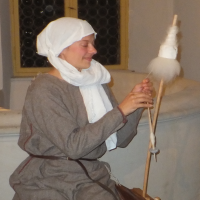
Hi Rachel, I have looked for more photos of you, but that was not very successful. I found a link on...
Guest - Beatrix Sprang Discussion
15 September 2026
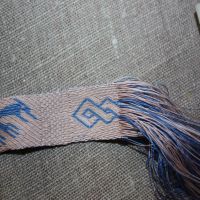
That lozenge pattern element is not a photograph, but a scan. So it should be to scale. But I pinned...
Guest - Katrin Sprang Discussion
15 September 2026
I was not referring to Rachel's reconstruction (is the reconstruction you refer to the one photograp...
Guest - Beatrix Sprang Discussion
14 September 2026
There is something Rachel did not mention. She told me: "Well, I worked with the measurements we too...
Guest - Katrin Sprang Discussion
14 September 2026
Well, this is certainly developing into an interesting discussion. Firstly, going from that lovely l...
OCT
15
1

I blame the internet...

... for this especially late blog post. Because I got distracted. By not one, not two, but three repositories:

Fornvännen, a Swedish journal, has searchable archives online. The articles are (of course) in Swedish; if you search for Inga Hägg, you will get several articles by her about Viking garments.

Also online, also for free: the London and Middlesex Archaeological Society's Transactions. Plus their newsletters and special papers. The archives go from 1860 to 2005, and the Transactions themselves are quite substantial.

And thirdly, the Durham e-theses - you can browse by department, see the newest additions, or search for a term.

I will get back to digging some more in these three places now. Yay for research to be found online!

0
SEP
30
0

There are things on the internet...

... that you would not expect. Well, me, at least.

Newest case in point? Old Bailey Proceedings.

Old Bailey is the central criminal court in Britain, and has been active since the 16th century. The court proceedings from 1674 onward are published, and they are also digitised and put online as a fully searchable repository.

You can go to the project website here, where you can learn more about what is digitised and how to use the search functions. And then, of course, browse through the records... Use for non-commercial purposes is free of charge, by the way, too.

This is one of the reasons why I love the internet. So much.
0
SEP
25
0

More exciting stuff.

I have sung its praise before, but it is time to do it again: EThOS - the "Electronic Theses Online Service" offered by the British Library. They basically list all the Theses of Britain, and as many of them as possible are downloadable. For free (you just need to register with them). It's even possible to order them on CD/DVD or as printout, though then they are obviously not free anymore, but will cost a bit to cover for material, time and postage. (If you are a multi-tab opener like me: resist the temptation. Downloads and links don't work properly when opened in a new tab, and the back button is not recommended for use; you'll need to click on "search results" or "order history" to go back to your lists. The site works smoothly that way, though.)

And there's more good free info stuff from Britain - meet the Portable Antiquities Scheme. It's a scheme trying to encourage members of the public from England and Wales who have found archaeological objects to register them in an open database. It's mostly metal objects, and there are very many of them - among it pins, needles, buckles, and spindle whorls. The search function is nice and works quite well, and there are additional filters to narrow down on item groups.
0
MAY
09
0

German Childhood.

When I was a child, my TV consume was not very great - but there were a few shows I enjoyed a lot, and watched quite often. One of them was "Die Sendung mit der Maus". The show is still running (the Mouse has turned 40 in 2011) and is still loved and appreciated by children... and adults.

Here is a snippet of it where they explain why the city Mannheim is called Mannheim. In German, of course... but very nicely.


0
FEB
22
0

TGIF.

It's a good thing that it is finally Friday - somehow, this week feels like it's been chock-full of activities of all different sorts.

Which it probably does because yes, it was chock-full of activities. Remember that to-do-list thingie I posted about last week? (In case you did not, here's a blogpost elsewhere that nicely explains it.) I'm still using it, and for the first time in ages I am not feeling only daunted by a very long list of things I have to keep track of and have to keep care of. Instead, I have been getting a sense of achievement by getting stuff done - some (relatively few, though) of my to-dos from the huge list have been dealt with (though most have led to more items being added in turn). What, to me, is even better: I have managed very well to get my "dailies" done. Dailies are small tasks that you set yourself for daily repetition, such as "sort books on shelf for 10 min".

Which means there has been noticeable progress in the sorting of the library (aka the bookshelf behind me). Noticeable progress in looking through a very old bookmark list. And very noticeable progress in me sticking to doing at least some shoulder and neck exercises to keep those computer-work tensions at bay. Keeping track of these little things and motivating myself to do a small bit every day, nibbling away at very large and time-consuming tasks, is something that I have been remarkably bad at in the past. Sticking with doing ten minutes of book sorting (and entering book titles into the database) for more than one week? That, for me, is really very good.

So this little to-do list tool has really done something for my productivity, and it has passed the first test: it has been in use for one week (actually more than that) and I haven't fallen off yet. In fact, I'm still very happy with it. And feeling very motivated. (And I have a goodly list of tasks to take over for the current daily tasks once those books and bookmarks have been sorted. Like going through my main bookmark list... which is, regrettably, not really organised at all.)

Oh, and by the way, here is one of my favourite at-your-desk exercise videos:


0
DEC
14
0

Friday! Yay!

I'm not sure whether I want to rejoice that it's Friday already, or moan that it's already Friday... I am looking forward to quite a few free days over the holidays and end of the year, spent together with friends and family, so I'm happy for every day that brings me closer to that - but on the other hand there's things that have to be taken care of before year's end (or will make the start of next year very, very busy and probably stressful).

So... hooray or oops? I can't decide.

At least the presents-for-the-folks-that-get-presents are almost all done. Just like in computer programming, this year it seems as if 90% of it (deciding and getting) took about 10% of the time, while the last ten percent... well, you know. But it's almost done, including a group effort for a bigger present from one of our friends.

Just a few batches of baking to be done, a few decisions on when to go to the market on Saturday, a few phone calls, a bit of organising for our time with friends, ah... the usual seasonal stuff.
And to be honest? I love it. I wouldn't want to miss any of it, it is a brilliant opportunity to meet people that you don't meet very often during the year and spend some time with them. And that alone would be enough reason for me to love this time of year.
0
NOV
21
0

Databases (again), part II.

Endnote is, according to their makers, the bestest citation software ever. As is Zotero (according to their makers). And probably a bunch of others as well.

Back when I was still trying out stuff and relatively new to the world of people working in physics (who have an affinity to LaTeX-the-programme), I wrote one article in TeX. I had to re-do it in MS Word to get it published, but this little stint meant that I got to know the powers of BibTeX, which is the citation system thingie that comes with TeX. It is, more or less, a reference database that you cite from, and the programme does the formatting.

Sound familiar? That's just what EndNote does with Word. Back when I then found out that there was, indeed, such a programme, I bought it for the hefty sum they asked for the student edition back then and have been using it ever since. There's connection files to get data from online library catalogues (something I should have used more, I now think, it might have saved me lots of work), style files that can be altered to suit individual needs, and both a field for "notes" (which I use for making general, personal notes about a reference) and "research notes" (which I use for typing excerpts or snippets including the page number so they can actually be used for working without the physical copy of the book). Plus there are custom fields - those I have used to mark whether I own a book (physical or digital copy), where it stands in my library (well, that's a work in progress to be honest), if I have pictures in my picture database (by noting down the prefix of the image files, such as schweppe_ which is, in the actual files, followed by a page number so I have files like schweppe_10.png) and if I have already read it or just jotted it down for future reading.

According to the version history, my purchase of the programme must have been in 2004. Which means that my version is a little... older. Now, I have no problem with older software (I'm happily using Word2000, and not planning to change from that), but sometimes, it pays to look for alternatives. Especially since my EndNote is sort of iffy on the connection files, with quite a few of them not working (or not working anymore), and I cannot download the whole set of new ones from the site (there is no such button in my installation menu).

Due to the recent mention of Mendeley by Phiala in the comments of some other post, I did a little looking and found Qiqqa - a .pdf organising software with built-in OCR, a wizard to help with filling out the reference data for each imported .pdf, and the possibility to cite to Word. I quite like it on the first try and am currently using it to get some order into my .pdfs. I have even considered changing to this programme from EndNote for all my referencing, but it does not do a few things that I have grown accustomed to, and I have also read that it's not too easy to modify citation styles (something I regularly need to do).

Qiqqa is intended for use over the web, with web storage of .pdfs, something which I don't need (and don't want). It allows "vanilla references", that is those without a .pdf attached, but then I get a nasty popup if I want to associate a file with it now. It also does import from EndNote - but not the "Research Notes". There is the possibility to search for duplicates, but I found it rather hard to compare the actual duplicates with each other and decide which one should stay and which one should go. I have not tried the citation thingie yet, but from the overall feel, it's very much geared towards .pdf files only, and I don't want to use two programmes. So at the moment, my plan is to use Qiqqa to get some order into my .pdf files, then export the data via BibTeX and a converter to EndNote, and merge the two databases. (That's the plan only, though - and it might change if problems with the import should arise. Or if Qiqqa should evolve some more, and then I might reconsider using it as my new reference database thingie.)

I'd be happy to hear about your experiences with Qiqqa, EndNote, Zotero or whatever you use!
0

By accepting you will be accessing a service provided by a third-party external to https://pallia.net/

Contact